How it works
After an order runs, Zonos processes the order and generates a 3D visualization showing exactly how items were packed into boxes. This visualization appears on individual orders in Dashboard, giving you full transparency into the cartonization process.
The 3D display helps ensure customers pay accurate shipping costs—if customers overpay, conversion can suffer, and if they underpay, merchants must make up the difference. By visualizing packing, you can fine-tune your packaging strategy for better accuracy.
3D cartonization supports both orders and quotes, showing the cartonization detail for each.
3D visualization display
Visualize exactly how items pack into boxes with an interactive 3D display on your orders and quotes. This feature provides complete transparency into the cartonization process, helping you understand packing efficiency, identify optimization opportunities, and build confidence in your shipping quotes.
The 3D display appears on individual orders in Dashboard and allows you to rotate the view to see how items fit within each box. This visualization helps you:
- Verify that items are packed efficiently into your available box options
- Identify whether additional packaging sizes could reduce wasted space
- Understand how weight and volume are distributed across multiple boxes
- Troubleshoot unexpected shipping costs by seeing the actual packed dimensions
Prerequisites for 3D display
The 3D cartonization display only appears when both of these conditions are met:
- Packaging options are configured — You must have box sizes set up in Cartonization settings that work for the shipment.
- Item dimensions and weights are provided — Products must have complete dimensional information added to Catalog, synced from your ecommerce platform, or passed via API.
If either requirement is missing, cartonization won't function efficiently and the 3D display won't appear on orders.
What you'll see
The 3D display shows an interactive visualization of each box in your shipment. You can click and drag to rotate the view and see how items are positioned within the box. Each visualization includes:
- Item details showing dimensions, volume, weight, and position coordinates
- Volume utilization percentage showing how efficiently the box space is used
- Weight load percentage showing how much of the box's weight capacity is used
- Visual indicators when packing is optimal, efficient, or could be improved
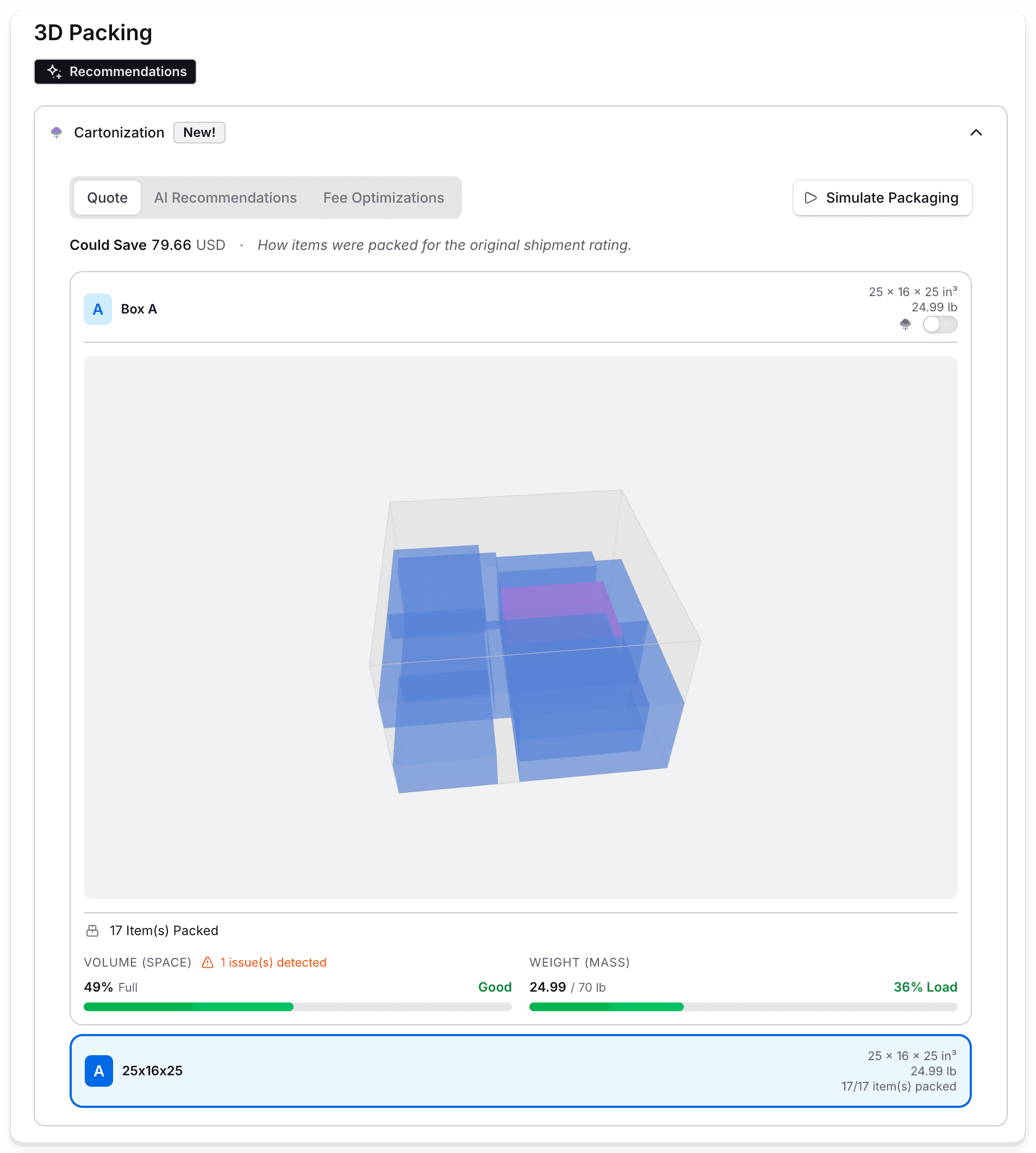
Data quality warnings
If products are missing dimensions or weights, the 3D display will show a data quality warning that identifies dimension-related and weight-related issues. These warnings help you pinpoint which products need updated information in order to generate accurate cartonization visualizations and shipping quotes.
Where can I see the 3D visualization?
The 3D display appears on individual orders in Dashboard. You can rotate the view to see how items fit within each box and view detailed packing information.
What do I need to set up to use 3D cartonization?
You need to:
- Configure packaging options in Cartonization settings
- Provide complete item dimensions and weights in Catalog or via your ecommerce platform integration
3D cartonization
Visualize packing efficiency with interactive 3D displays to gain transparency into the cartonization process.
3D cartonization provides powerful visualization tools to help you understand how items pack into boxes. With interactive 3D displays, you can verify packing efficiency, identify optimization opportunities, and build confidence in your shipping quotes.
Looking to optimize shipping costs? See packing optimization for carrier-fee optimized packing, packaging option recommendations, and packaging simulation.
Currently available to Zonos users. It will soon be available to merchants using plugins, checkout, or API. Not available for postal users or verified accounts.